
Blueleaf Billing: Revenue Dashboard Overview
The Revenue Dashboard reports one billing period at a time, built from the billing run for that period.
Reading the Revenue Dashboard:
Three filters at the top controls what you see:
- Period: picks the current period you are looking at, and lists every period you have a billing run for as well as the projected billing run.
- Compare to: picks the period the change figures measure against, and lists every period except the one you are on.
- Advisor: narrows the whole page to one advisor’s clients. Set it back to All for the whole firm

Firm level:

- Billable AUM - totals the billable assets in the run.
- Period Revenue - is the fees for the period.
- Annualized Revenue - is that figure times four (quarterly) or twelve (monthly)
- Avg Fee Rate - is the annualized rate across the clients that produced a fee.
- Billable Clients - counts the clients that billed something, against the number of clients in the period.
The small number under the first four tiles is the change against the period in the “Compare to” drop-down.
Charts:
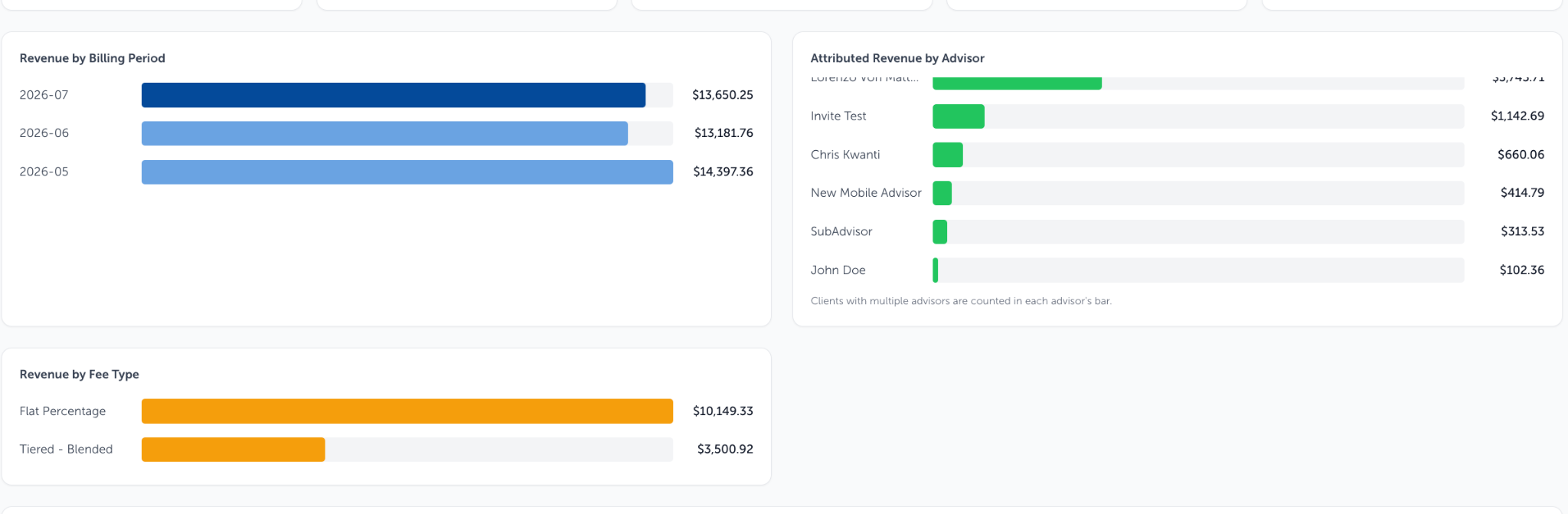
- Revenue by Billing Period - puts the selected period alongside the others, highlighted.
- Revenue by Advisor - ranks advisors by the fees of the clients they are primary advisor on.
- Revenue by Fee Type - splits the same total by the kind of AUM Schedule each client is on, with clients on no schedule grouped under No Schedule.
Client level Table:
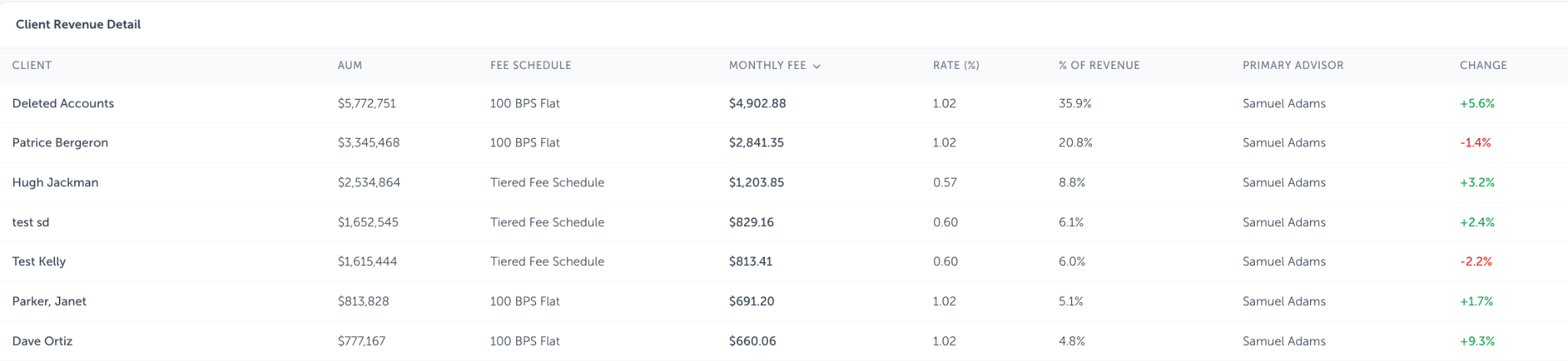
Client Revenue Detail lists every client in the period: AUM, fee schedule, the fee for the period, the annualized rate, share of revenue, primary advisor, and the change against the compare period.
Click any column heading to sort by it. A client that does not appear at all in the compare period shows "New"
Excluded accounts contribute no AUM and no fee, so a client billed on only part of their accounts shows only that part here.
If revenue lands under the wrong advisor:
Revenue is credited to the primary advisor recorded on the client. That assignment is not editable in Blueleaf billing. Change the marketing contact in Blueleaf to set the primary advisory in Blueleaf Billing. Change it in Blueleaf: Selecting the "marketing contact" for a client
Need help? Email vipsupport@blueleaf.com with any billing questions, feedback, or issues.